Exporting org files to the Eisvogel latex template
Posted on June 12, 2026Eisvogel is a clean modern pandoc LaTeX template. This post explains how to export org mode files to PDFs using that template using the org export dispatcher.
For the same org file, the difference between org mode's built in latex export (left) and the Eisvogel template (right) is:
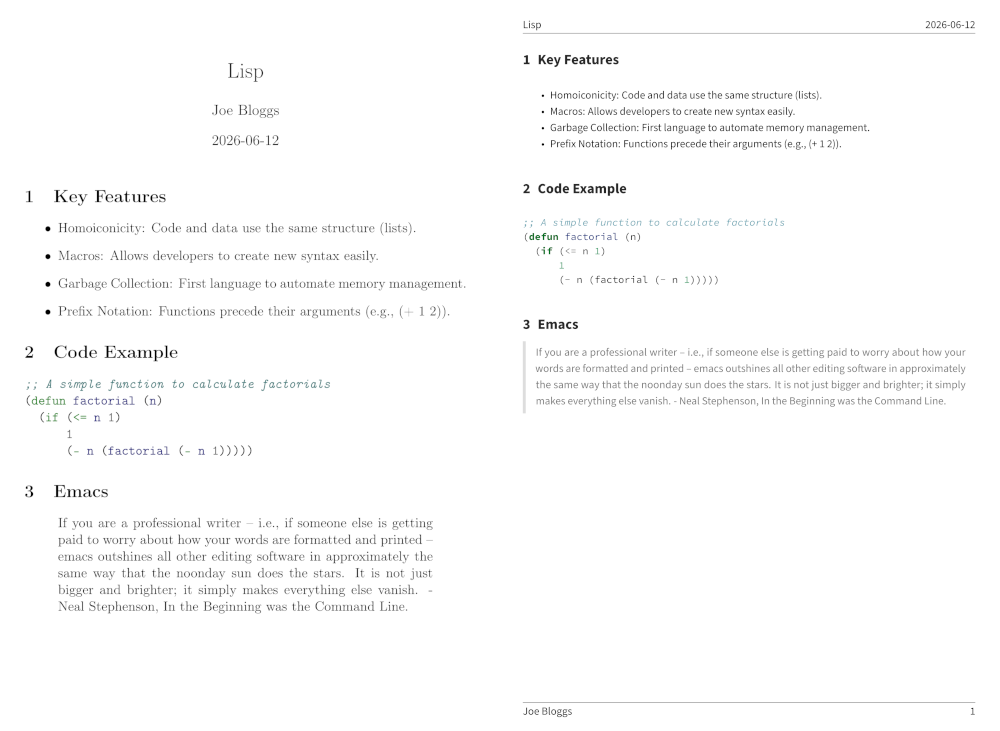
Step 1) Install and set up Eisvogel
- Install Eisvogel with these instructions.
- Add
(require 'ox-pandoc)to your init file.
Step 2) Exporting to the Eisvogel template
You have two options:
- Export specific org files with the Eisvogel template.
- Export all org files to the Eisvogel template.
Option 1) document specific export
Add this to the specific org file:
#+PANDOC_OPTIONS: template:~/.local/share/pandoc/templates/eisvogel
If you are using MacOS or Windows, in the above you should specify the location
where you extracted the eisvogel.latex file (but omit the .latex part in
PANDOC_OPTIONS).
Option 2) global org export
Alternatively, if you wish to apply the Eisvogel template to all exported org files, add this to your Emacs init file:
(setq org-pandoc-options-for-latex-pdf '((template . "~/.local/share/pandoc/templates/eisvogel")))Step 3) Export
- Open the org export dispatcher with
C-c C-e - Hit
pto select the pandoc export menu, thenLto export to PDF.
You are done. The generated PDF will be using Eisvogel template.
You can customise the layout, described below.
Step 4) Customisation of generated PDF
You can modify the generated PDF by modifying pandoc variables and Eisvogel template variables.
Pandoc variables
Again, you have two options:
- Customise Pandoc variables for specific org files.
- Customise Pandoc variables for all org files.
Option 1) document specific Pandoc variables
Pandoc has many document writer options.
Specify these in your org file e.g.
#+PANDOC_OPTIONS: number-sections:t
#+PANDOC_OPTIONS: pdf-engine:xelatex
Option 2) global org Pandoc variables
Alternatively, you can specify these writer options for exporting all your org files to PDF e.g.
(setq org-pandoc-options-for-latex-pdf
  '((template . "~/.local/share/pandoc/templates/eisvogel")
    (number-sections . t)
    (pdf-engine . "xelatex")))
Eisvogel variables
You can use modify Eisvogel template variables to customise the outputted PDF.
Do this at the document specific level, e.g.
#+PANDOC_VARIABLES: titlepage:t
#+PANDOC_VARIABLES: "header-right:confidential document"